Web AI: Everything You Need to Know About On-Device AI for the Web


- Premium Results
- Publish articles on SitePoint
- Daily curated jobs
- Learning Paths
- Discounts to dev tools
7 Day Free Trial. Cancel Anytime.
Over the last two years, AI innovations have compounded across various industries, increasing the demand for deploying AI applications across different environments, and the Web is no exception.
The toolchain, pipeline, and deployment needs of AI on the web require understanding Web AI and in this article, we explore how Web AI powers on-device AI inferencing for Web applications.
AI Deployment — The Shift
AI deployment is expanding beyond cloud AI to on-device AI, and the choice of deployment depends on different technical needs. For example, in self-driving cars, where models need to make instant predictions based on real-time data from sensors and cameras, models are deployed close to where data is generated — on-device — to ensure non-latent data processing. In Smart homes/cities and in healthcare, on-device AI is a more practical solution.
With Web applications gaining access to host device compute through APIs like WebGPU, WebAssembly, and emerging standards such as Web Neural Network API, deploying AI models directly in the browser is becoming even more practical.
What is Web AI
Web AI is the web’s abstraction layer over device compute, which allows models to run on the browser. In contrast to Cloud AI, where models are deployed on cloud infrastructure, Web AI provides the tools and APIs for client-side model inference.
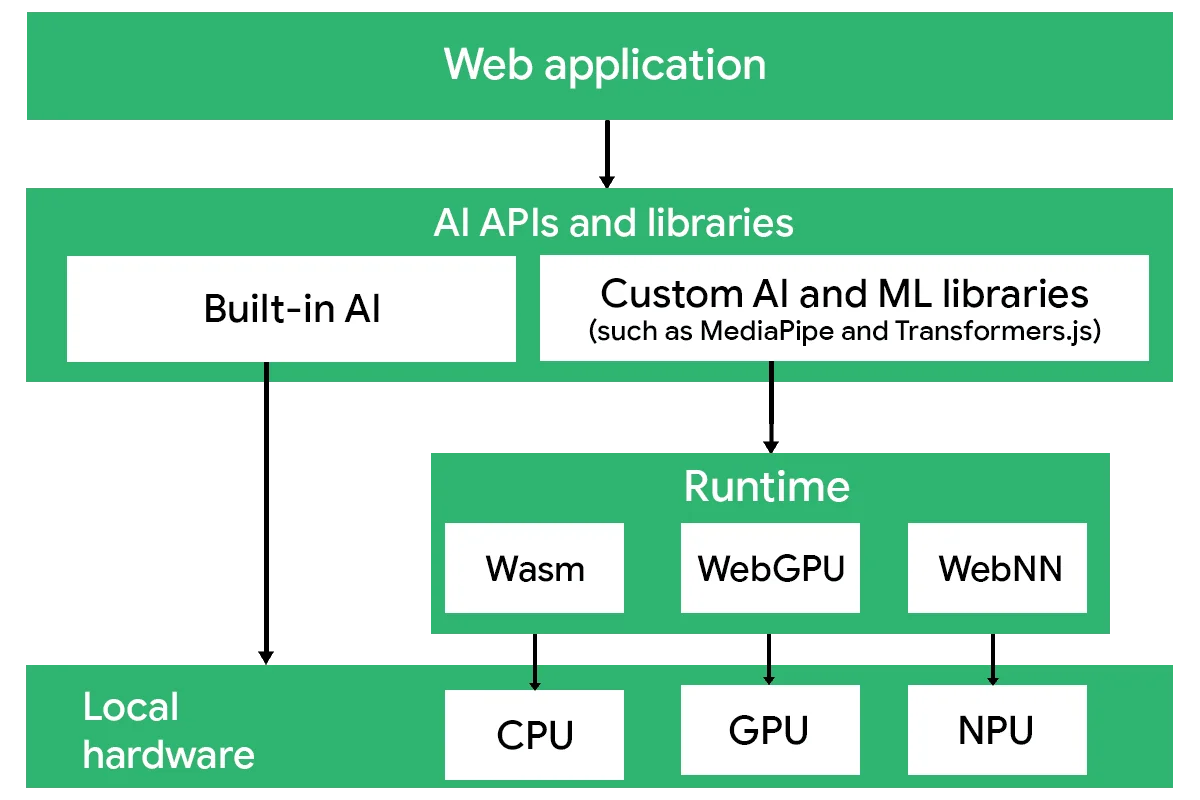
Web AI can be divided into libraries that interact with model tasks and pipelines, and an execution stack that carries out inference within the browser environment.
Web AI Libraries
Web AI libraries and built-in Web APIs provide the orchestration layer for AI applications in the browser. They allow developers to select models, download them, cache them locally, and construct task pipelines for processing web-generated data.
This layer manages model lifecycle and data flow, handling input and output transformations, chaining multiple models together, and coordinating task-level operations such as converting text to embeddings or routing embeddings into downstream generation tasks. By abstracting these responsibilities, the libraries separate pipeline logic from the underlying execution stack.
Execution Stack
The Web AI execution stack is responsible for performing model computation within the browser. While libraries manage model lifecycle and pipeline orchestration, the execution stack handles how and where inference actually runs on client hardware.
The execution stack consists of two primary layers:
Runtime Engines
Runtime engines act as the intermediary between Web AI libraries and the underlying web backends. They load the model into memory, translate model operations into executable instructions, and manage inference sessions. By abstracting the backend, they allow models to execute across different compute targets without requiring changes to application logic.
Runtime engines are designed to efficiently execute pre-optimised models to improve the performance on constrained hardware.
Some common runtime engines include:
- ONNX runtime Web: Which executes models in the
.onnxformat and supports multiple web backends. - LiteRT.js: The web adaptation of TensorFlow Lite, designed for efficient inference of
.tflitemodels, with support for model conversion from other machine learning frameworks. - TensorFlow.js: A JavaScript-based machine learning framework that includes models, runtime engines, and multiple web backend support.
Web Backends
Web backends provide the compute abstraction layer that interfaces directly with browser-exposed hardware capabilities. These backends execute low-level operations and kernels required for model inference.
Common web backends include:
- WebAssembly for CPU-based execution
- WebGPU and WebGL for GPU acceleration
- Web Neural Network API for high-level ML operator acceleration that may leverage CPU, GPU, or NPU hardware, depending on platform support
Together, runtime engines and web backends form the execution path that translates model graphs into hardware-level computation within the browser environment.
Difference between Cloud AI and Web AI
Although both Cloud AI and Web AI enable model inference within applications, they differ fundamentally in where computation occurs and how models are deployed. Here is how they can be distinguished:
| Web AI | Cloud AI |
|---|---|
| Web AI processes data on the device | Cloud AI processes data on the cloud. |
| Applications interact with models locally in the browser. | Applications send requests over the network to models. |
| The model is deployed on-device. | The model is deployed on cloud infrastructure. |
| Supports client-side in-browser model execution. | Supports remote cloud-based model execution. |
| The execution stack is exposed to the developer. | The execution stack is abstracted behind a server API |
Benefits Of Web AI
Reduced latency: Since inference executes locally on the client device, it removes network round-trips and transmission delay.
Cost savings: Because model execution relies on client compute resources, server-side infrastructure and AI credit costs are not required.
Data privacy: As data remains on the client device, no external transmission or server-side processing is involved.
Offline Use: Web AI enables offline AI capabilities since network connectivity is not needed to process AI functionalities.
Real-Time Processing: Web AI enables processing data in real-time, which is especially necessary for video and audio processing.
AI Implementation - The Web AI Stack
Web AI can be implemented at different levels of abstraction, depending on how much control you need over model selection, runtime configuration, and execution. Some approaches abstract most of the underlying infrastructure, while others require direct management of models and runtime engines.
In practice, Web AI implementations generally fall into three categories:
- Built-in AI
- Open-source libraries
- Standalone ports
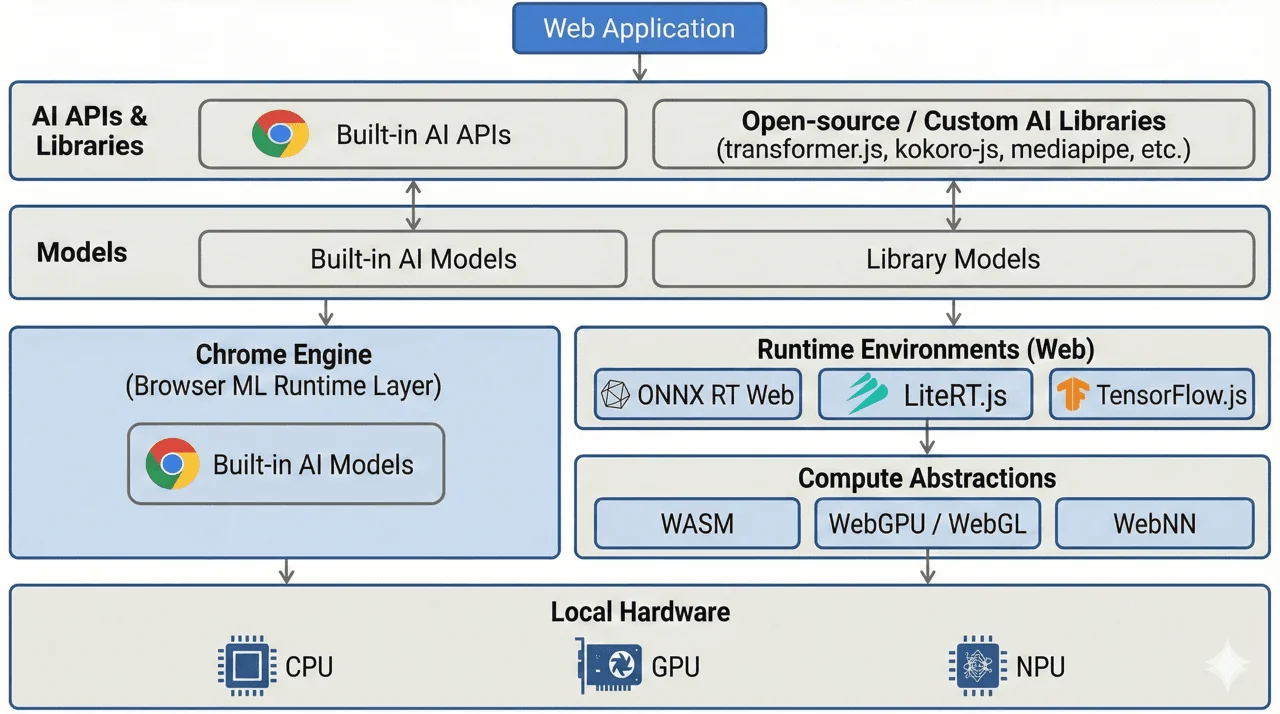
Built-in AI
Built-in AI is a standardised browser interface for accessing AI capabilities within the browser. They maintain a high level of abstraction for the Web AI stack, as it relies entirely on the Web API interface to interact with AI models.
Built-in AI is the simplest way to implement Web AI, requiring no setup or installation, and is designed to work within supported browsers.
They are great for common natural language processing tasks and lightweight AI features in web applications.
Some common use cases for Built-in AI include:
- Language Models: Language expert model exposed through the Language Detector API and Translator API for text-based language detection and translation.
- Generative AI APIs: In some browsers, such as Chrome, these APIs may rely on foundation models like Gemini Nano to perform summarisation, text generation, grammar correction, and other text-related tasks. Examples include the Summarizer API, Prompt API, Proofreader API, and Writer/Rewrite API.
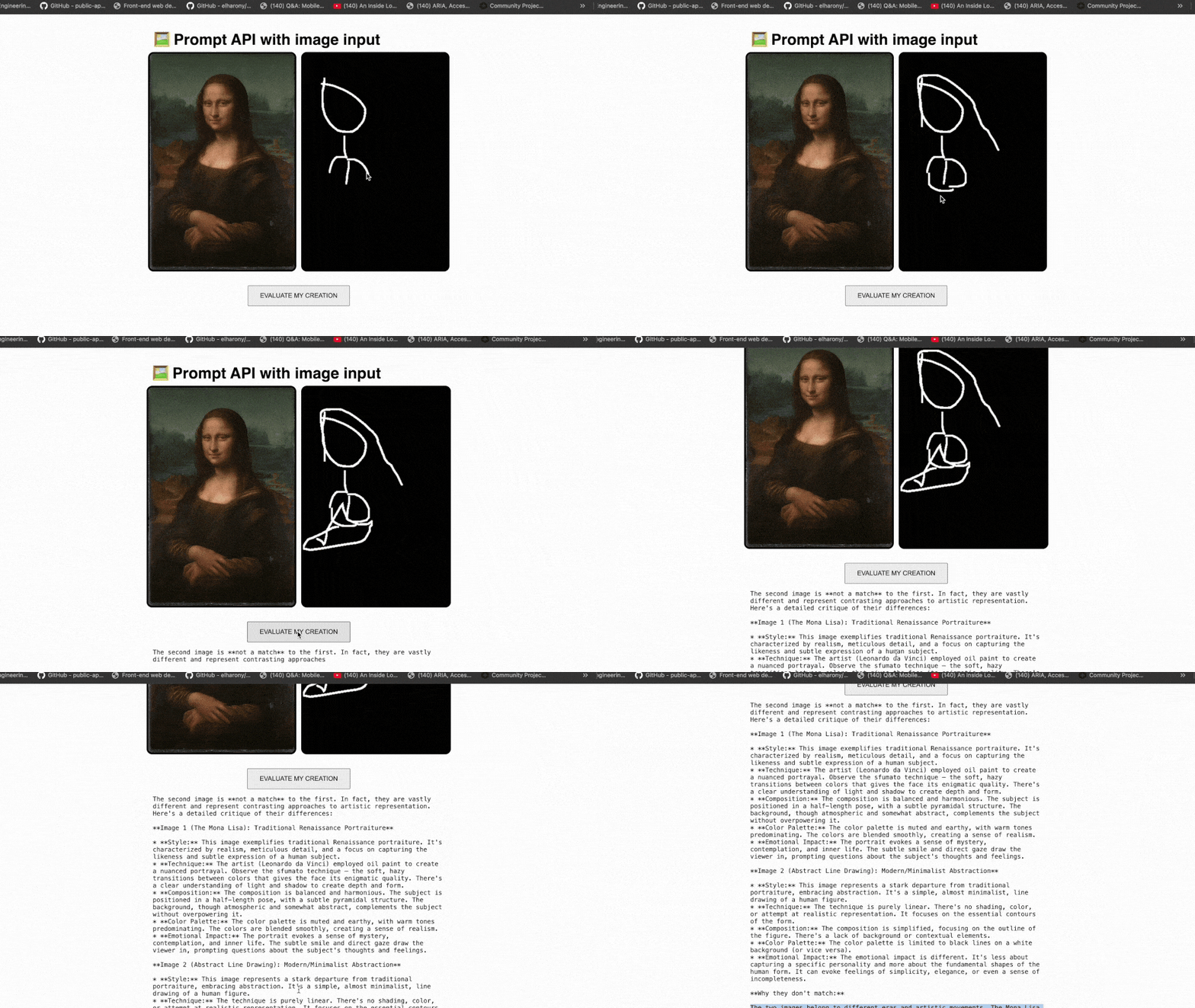
- Multimodal Capabilities: The Prompt API supports multimodal functionalities like audio transcription, image description, and text-based tasks by processing image, audio and text of multiple languages.
Built-in APIs are best suited for applications that prioritise simplicity and minimal stack management.
Open-source libraries
Unlike Built-in APIs, open-source libraries are more flexible for implementing Web AI. They allow developers to choose between models, configure runtime or web backends, and run custom models on the browser. Because of this flexibility, they require more effort to set up and are great for teams who want greater control over models, pipelines, or low-level abstractions.
Open-source libraries are portable, allowing models to be executed across different environments, including the browser and server.
Here are some of the most common open-source libraries;
Transformer.js
Transformer.js is a popular JavaScript library that provides developers access to 1200 pre-trained models for execution on the browser. The library supports ready-to-use AI pipelines, while also allowing pipeline customisation for specific AI tasks.
Transformers.js performs model inference using ONNX Runtime Web, which executes .onnx models within the browser.
AI task supported by Transformer.js:
- Natural Language Processing: transformer-based text tasks such as classification, named entity recognition, question answering, summarisation, translation, and text generation.
- Computer Vision: image-based inference tasks including classification, object detection, segmentation, and multimodal vision-language processing.
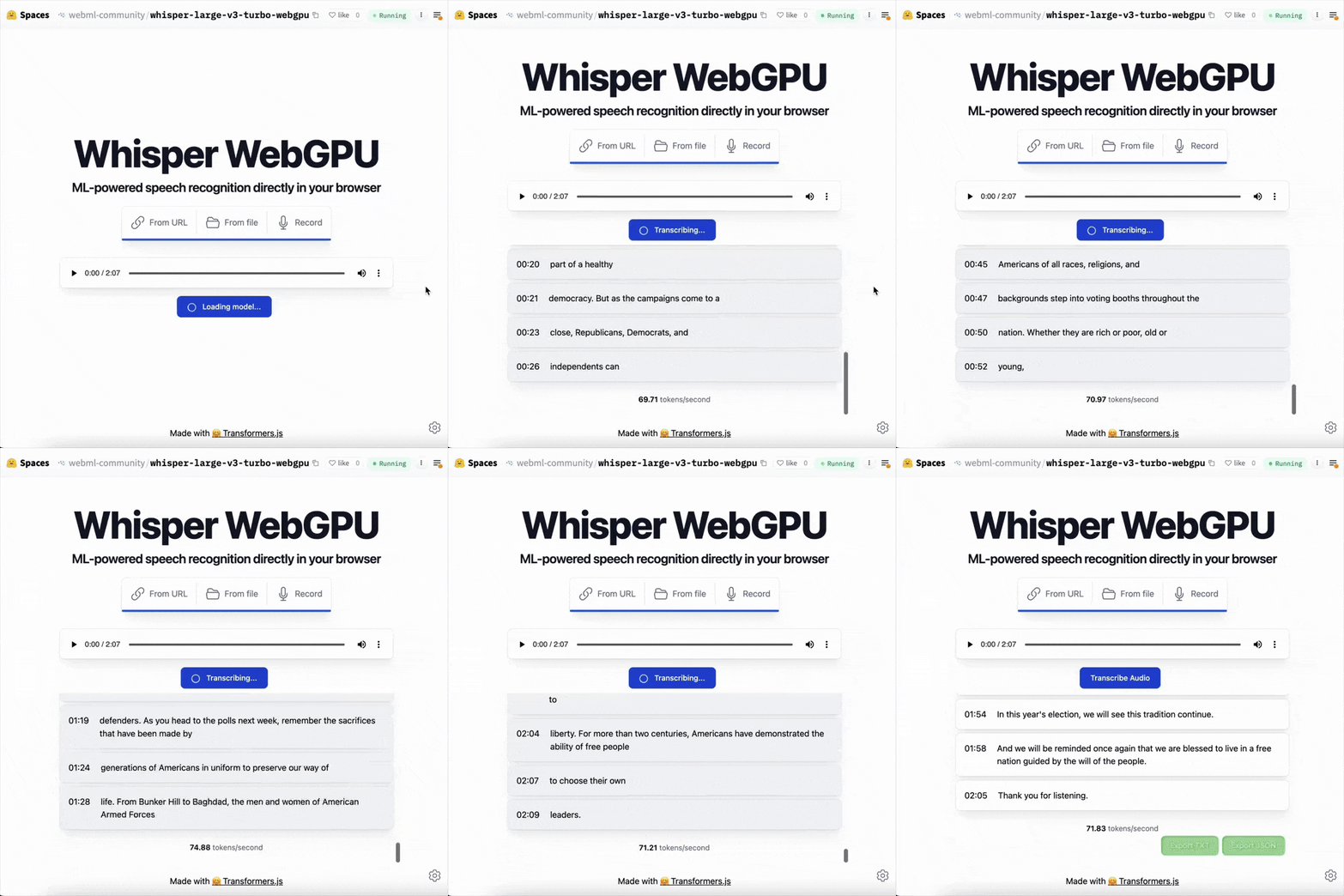
- Audio Processing: speech and audio inference workloads such as automatic speech recognition (ASR), audio classification, and music generation.
- Multimodal Tasks: cross-modal pipelines combining text, image, or audio inputs, including image-to-text, document question answering, and embedding generation.
MediaPipe
MediaPipe is a cross-platform machine learning framework maintained by Google, originally focused on real-time computer vision and perception tasks, and more recently extended to support text and audio tasks.
MediaPipe supports the deployment of pre-converted .tflite models and ships with its own runtime engine, built on WebAssembly, which makes it a more self-contained execution framework for model inference.
AI capabilities supported by MediaPipe include:
- Computer Vision: real-time perception tasks such as object detection, segmentation, and video processing, including background segmentation used in platforms like Google Meet.
- Augmented Reality: facial and pose landmark tracking for avatars and full-body AR experiences.
- Generative & Language Tasks: on-device LLM inference and text-based generation workflows, including text-to-text, text-to-image, embeddings, classification, and Retrieval Augmented Generation (RAG).
- Audio: audio inference tasks, such as audio classification tasks

TensorFlow.js
TensorFlow.js is a JavaScript ML library built on TensorFlow concepts that supports both model training and inference in browser and Node.js environments. It is suited for custom model development and also provides a collection of pre-trained models for tasks such as object detection, toxicity and spam detection, and audio event classification.
TensorFlow.js has been used to enable client-side, offline inference in production applications, for example, object selection features in Adobe web products.
These libraries represent some of the most widely adopted open-source approaches for Web AI. For use cases that require a single, single-capability AI capabilities standalone model ports provide a lightweight and specialised alternative.
Standalone Ports
Standalone ports are modular open-source libraries focused on a single AI task. They are suited for teams that require specific, self-contained AI capabilities without adopting a full general-purpose ML framework.
These ports typically consist of models trained in other ecosystems and converted to browser-compatible formats such as .onnx or .tflite, enabling execution through web-based runtime engines.
Examples include:
Silero
Silero provides a collection of speech models, including automatic speech recognition (ASR), text-to-speech (TTS), speech-to-text (STT), and voice activity detection (VAD).
Silero VAD is a specialised model designed to detect the presence or absence of speech activity in an audio stream. Ricky0123/vad is the JavaScript adaptation of Silero VAD for browsers.
VITS-Web
VITS-web is a text-to-speech model ported from the python-based the Piper TTS library models. Built by the diffusion studio VITS-web and supports over a hundred voices in the browser.
Kokoro-js
Kokoro-js is a JavaScript port of the Kokoro-TTS model, enabling lightweight text-to-speech inference in web environments.
The Web AI ecosystem continues to evolve, expanding the ways AI can be deployed in the browser. Understanding the different approaches for implementing Web AI would enable effective and intentional use of the technology.
Limitations
Web AI introduces several constraints that require consideration during implementation:
- Hardware variability: Client devices differ significantly in CPU, GPU, and memory capacity, which can affect model quality and speed.
- Model size constraints: Large models increase download size, memory usage, and computation demands, making them difficult to deploy efficiently in browser environments.
- Memory pressure: Running models in the browser competes with other application resources, which can lead to instability or forced garbage collection.
- Browser support fragmentation: Built-in AI APIs may have limited cross-browser support, as some features remain experimental or vendor-specific.
Conclusion
On-device AI adoption is expanding across platforms, including Android, iOS, and the Web, supported by growing community contributions and enterprise investment. Hardware advancements such as AI-accelerated PCs from Intel could potentially strengthen compute capabilities.
At the same time, emerging browser standards and improved runtime support are enabling heavier AI workloads on the browser, and as the ecosystem continues to mature, Web AI could impact how models are deployed and interacted with.